Amazon Echo Speakers and Smart Displays | 5 Devices to Compare
This revised guide removes duplicate Echo Dot entries and stale identical price claims. It compares five distinct Echo speakers and smart displays by screen, room role and privacy controls.

Products in this comparison
1. Amazon Echo Show 8
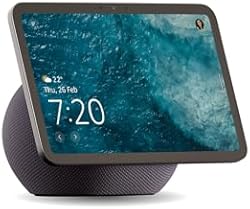
An 8.7-inch-class smart display with Alexa, screen controls and spatial-audio positioning in the indexed listing.
Best for: Kitchens, desks or shared rooms needing a mid-size screen.
Check before ordering: Confirm generation, screen size, camera features and supported smart-home protocols.
2. Amazon Echo Show 11

A larger Full-HD smart display with Alexa and spatial-audio positioning.
Best for: A room where a larger screen is useful for visual information and compatible video features.
Check before ordering: Compare footprint, camera controls, wall or counter placement and service availability.
3. Amazon Echo Show 5 — 3rd Generation
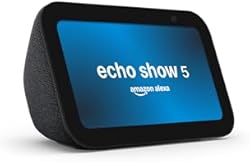
A compact smart display with Alexa, a camera and a smaller bedside-or-desk footprint.
Best for: Small surfaces where a clock, timers and basic visual Alexa responses are useful.
Check before ordering: Verify generation, camera shutter, speaker specification and power requirements.
4. Amazon Echo Spot
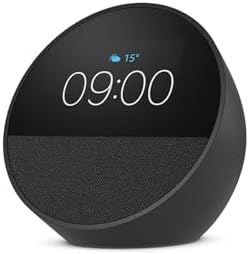
A compact smart alarm-clock format with Alexa and Bluetooth.
Best for: Bedside use where a clock-focused display is preferred over a full video screen.
Check before ordering: Confirm which visual and camera features are or are not included.
5. Amazon Echo — 4th Generation

A full-size Echo smart speaker with Alexa and Dolby-audio positioning, without a display.
Best for: Music and voice control where a screen is unnecessary.
Check before ordering: Verify generation, smart-home hub support, audio connections and room placement.
Quick comparison
| # | Product | Useful for |
|---|---|---|
| 1 | Amazon Echo Show 8 | Kitchens, desks or shared rooms needing a mid-size screen. |
| 2 | Amazon Echo Show 11 | A room where a larger screen is useful for visual information and compatible video features. |
| 3 | Amazon Echo Show 5 — 3rd Generation | Small surfaces where a clock, timers and basic visual Alexa responses are useful. |
| 4 | Amazon Echo Spot | Bedside use where a clock-focused display is preferred over a full video screen. |
| 5 | Amazon Echo — 4th Generation | Music and voice control where a screen is unnecessary. |
Which Echo type fits your room?
- Screen or no screen: displays can show timers, cameras and visual information, while speakers take less space.
- Placement: compare device dimensions, power-cable reach and speaker direction for the intended room.
- Smart-home support: verify that each bulb, plug, camera or hub works with the specific Echo and Alexa features you plan to use.
- Privacy: review microphone and camera controls, household profiles and voice-purchase settings.
- Connectivity: stable Wi-Fi, an Amazon account and compatible services may be required.
Before you buy
- Decide screen or no screen first: the Echo Show 8, Show 11, and Show 5 are smart displays for timers, video, and visual info; the Echo Spot is a clock-focused bedside display; the Echo 4th gen is a speaker with no screen — pick by the room's job.
- Measure the placement: compare each device's footprint and power-cable reach with the shelf, desk, or bedside table it will sit on; the Show 11 is substantially larger than the Show 5.
- Confirm the generation: Echo devices iterate — the Show 5 here is 3rd generation and the Echo is 4th generation. Generations differ in audio, camera, and smart-home support, so verify the generation in your cart.
- Check smart-home compatibility: verify that your specific bulbs, plugs, cameras, or hubs work with the Echo model and the Alexa features you plan to use — not all devices support every protocol.
- Review privacy controls: check the microphone mute, camera shutter or disable options (especially for bedroom or kids' rooms), household profiles, and voice-purchasing settings before setup.
Frequently asked questions
Which Echo is best for the kitchen?
A mid-size display like the Echo Show 8 suits kitchens — timers, recipes, and video on screen with spatial audio. The larger Show 11 works if you have the counter space; a speaker-only Echo is fine if you just want music and voice control.
Do I need a smart display, or is a speaker enough?
If you only want music, timers by voice, and smart-home control, the Echo 4th gen speaker is enough. A display adds visual timers, video calls, camera feeds, and on-screen info — useful in kitchens and living rooms, overkill for a hallway.
Can these devices control my existing smart home?
It depends on your devices. Check that each bulb, plug, camera, or hub is compatible with Alexa and with the specific Echo model — some features need particular protocols or the device's built-in hub support.
What about privacy with the camera and microphone?
Echo devices have microphone-off buttons, and display models have camera shutters or software disables. Review these controls plus voice-purchase PINs and household profiles during setup, especially for shared or children's rooms.
Editorial note: These five Echo devices were selected from Amazon India to compare by room role — mid-size display, large display, compact bedside display, smart alarm clock, and full-size speaker — instead of listing near-identical Dots. Purni Finds did not set up or test these devices; generations, screen sizes, camera features, and smart-home protocol support come from the retailer listings, and the linked pages are final since specifications and prices change.


Comments
Post a Comment